A hands-on introduction to quanteda built around an unlikely teaching corpus: every line of dialogue from How I Met Your Mother. Covers corpus construction, preprocessing, document-feature matrices, similarity, networks, and collocations.
Authors
Roa, J.
Fonseca, A.
Kraess, A.
Published
November 15, 2022
How We Met Quanteda
November 2022 · Berlin
Roa, J., Fonseca, A., Kraess, A.
How I Met Your Mother — six seasons of objects, one frameTelevision corpus · 208 episodes, 2005–2014 A corpus is not a document — it is the arrangement. Five voices over nine years, each measurable by frequency, each locatable by co-occurrence, each distinguishable by what it says most often and least. The tools that read this one read any other with the same keystrokes.
Objective
This workshop uses the quanteda R package to analyze the television series How I Met Your Mother and walk through the package’s main tools — corpus building, tokenisation, document-feature matrices, similarity & distance, character-frequency tracking, wordclouds, network plots, and multi-word collocations. The point is not the show; the point is that the same pipeline scales to any text data, and a sitcom is a friendlier playground than a parliamentary corpus when you’re learning the API for the first time.
How I Met Your Mother
Why this corpus
How I Met Your Mother ran for 9 seasons and 208 episodes between 2005 and 2014.
A multi-character sitcom with stable principals, recurring secondary characters, and
well-defined seasonal arcs is an unusually well-shaped corpus for teaching: the
structure (5 anchors + a long tail of recurring names) makes frequency, network, and
KWIC analyses produce visibly correct results without forcing the audience to
memorise an unfamiliar domain first.
"The story of five friends sitting in their favorite booth at MacLaren's, their lives
unfolding in front of each other..."
Principal Characters
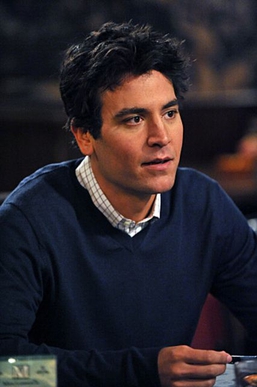
Ted
Josh Radnor
Barney
Neil Patrick Harris
Robin
Cobie Smulders
Marshall
Jason Segel
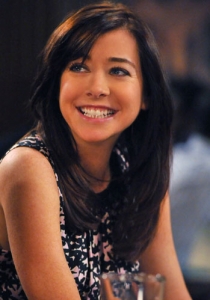
Lily
Alyson Hannigan
“Some believe HIMYM is Ted’s story. Others think that it is Marshall and Lily’s story. And there’s a whole school of thought that it’s no one else but Barney’s story. We’d like to think it’s all of their stories — there won’t be a Ted without Barney, a Lily without Marshall, and definitely no Robin without a Ted (and Barney too).” — framing taken from the original IDS workshop materials
Setup
The libraries below cover the full pipeline. The original workshop also used polite, rvest, and httr for the live web-scrape step that produced the corpus — those are not loaded here because the data is already on disk.
readtext — loading plain-text and formatted docs into R
dplyr · stringr — data wrangling and regex extraction
ggplot2 · ggrepel — plotting + non-overlapping text labels
RColorBrewer — categorical and sequential palettes
Show / hide code
setup.R
library(quanteda)library(quanteda.textplots)library(quanteda.textstats)library(readtext)library(stringr)library(dplyr)library(ggplot2)library(ggrepel)library(RColorBrewer)# Custom ggplot theme for the dark site — transparent backgrounds so the page# shows through, light text colours so labels remain readable.theme_dark_transparent<-function(base_size=12){theme_minimal(base_size =base_size)%+replace%theme( plot.background =element_rect(fill ="transparent", color =NA), panel.background =element_rect(fill ="transparent", color =NA), panel.grid.major =element_line(color ="#37474f"), panel.grid.minor =element_blank(), axis.text =element_text(color ="#cfd8dc"), axis.title =element_text(color ="#eceff1"), plot.title =element_text(color ="#ffffff", face ="bold", hjust =0, margin =margin(0, 0, 10, 0)), plot.subtitle =element_text(color ="#b0bec5", hjust =0), plot.caption =element_text(color ="#78909c", hjust =0), legend.background =element_rect(fill ="transparent", color =NA), legend.key =element_rect(fill ="transparent", color =NA), legend.text =element_text(color ="#cfd8dc"), legend.title =element_text(color ="#eceff1"), strip.background =element_rect(fill ="transparent", color =NA), strip.text =element_text(color ="#eceff1"))}theme_set(theme_dark_transparent())# par() defaults for base-R plots (dendrograms, wordclouds, networks) so they# match the light-on-transparent palette used by ggplot.par_dark<-function(){par( bg =NA, col.axis ="#cfd8dc", col.lab ="#eceff1", col.main ="#ffffff", col.sub ="#b0bec5", fg ="#cfd8dc")}# Tutorial-wide palette — Material Design 300/400 brightness range.# All colours stay readable on the dark page; first one is the site accent.tutorial_pal<-c( blue ="#64B5F6", coral ="#FF8A65", mint ="#81C784", gold ="#FFCA28", purple ="#BA68C8", cyan ="#4DD0E1", pink ="#F48FB1", amber ="#FFB74D")# Per-character colours for the principal-cast plots (5 named lines).principal_colors<-c( Ted ="#64B5F6", Marshall ="#81C784", Lily ="#F48FB1", Robin ="#FFCA28", Barney ="#FF8A65")# Path to the scraped HIMYM scripts. The directory holds 208 episode .txt# files named like "how-i-met-your-mother_04e23.txt".texts_dir<-"texts/how-i-met-your-mother"# Principal cast: the five main characters who anchor the show.principals<-c("Ted", "Marshall", "Lily", "Robin", "Barney")
How the corpus was sourced (web-scrape)
The 208 .txt files were produced once with a polite scrape of SpringfieldSpringfield.co.uk — a public archive of TV transcripts. The code below is from the original notebook and is shown for reference only; we don’t re-execute it on every render. If you ever need to refresh the corpus, this is the pattern.
Show / hide code
scrape-demo.R
# library(rvest); library(polite); library(httr)v_tv_show<-"how-i-met-your-mother"v_url_web<-"http://www.springfieldspringfield.co.uk/"# Bow before scraping — checks robots.txt and crawl delaysession_information<-bow(v_url_web)# Identify yourself when scraping (good citizenship)v_url<-paste0(v_url_web, "episode_scripts.php?tv-show=", v_tv_show)rvest_himym<-session(v_url,add_headers(`From` ="you@example.com", `UserAgent` =R.Version()$version.string))# Discover episode URLs, then loop and save each script as a .txthtml_url_scrape<-rvest_himym|>read_html(v_url)hrefs<-html_nodes(html_url_scrape, ".season-episode-title")|>html_attr("href")for(xinhrefs){Sys.sleep(runif(1, 0, 1))# be polite — random pause between requeststext_html<-read_html(paste(v_url_web, x, sep ="/"))|>html_nodes(".scrolling-script-container")|>html_text()# ... write each episode as its own .txt under texts/how-i-met-your-mother/}
Why the scrape isn’t live in this tutorial. Two reasons. First, web-scraping inside a tutorial render is fragile — if the source page changes structure or rate-limits, your whole site build breaks. Second, the politeness pattern (Sys.sleep, identification headers, bow) is the point of this section: it teaches the how, not the data acquisition itself. Run the loop once locally; commit the resulting .txt files; let chunks downstream read from disk.
1. Load the episode scripts
readtext() is the canonical companion to quanteda for getting text off disk. We point it at the directory and let it discover every .txt file. The filenames carry the season and episode (04e23 → Season 4, Episode 23), so we parse them out as document-level variables.
Show / hide code
load-scripts.R
scripts<-readtext(file.path(texts_dir, "*.txt"))scripts<-scripts|>mutate( season =as.integer(str_extract(doc_id, "(?<=_)\\d+(?=e)")), episode =as.integer(str_extract(doc_id, "(?<=e)\\d+(?=\\.txt)")))dim(scripts)#> [1] 208 4head(scripts|>select(doc_id, season, episode), 5)#> readtext object consisting of 5 documents and 1 docvar.#> # A data frame: 5 x 4#> doc_id season episode text #> * <chr> <int> <int> <chr> #> 1 how-i-met-your-mother_01e01.txt 1 1 "\"\"..."#> 2 how-i-met-your-mother_01e02.txt 1 2 "\"\"..."#> 3 how-i-met-your-mother_01e03.txt 1 3 "\"\"..."#> 4 how-i-met-your-mother_01e04.txt 1 4 "\"\"..."#> 5 how-i-met-your-mother_01e05.txt 1 5 "\"\"..."
208 episodes loaded, season + episode attached. That’s enough metadata to do the per-season comparisons, dendrograms, and character-frequency tracking that follow.
2. From text to corpus
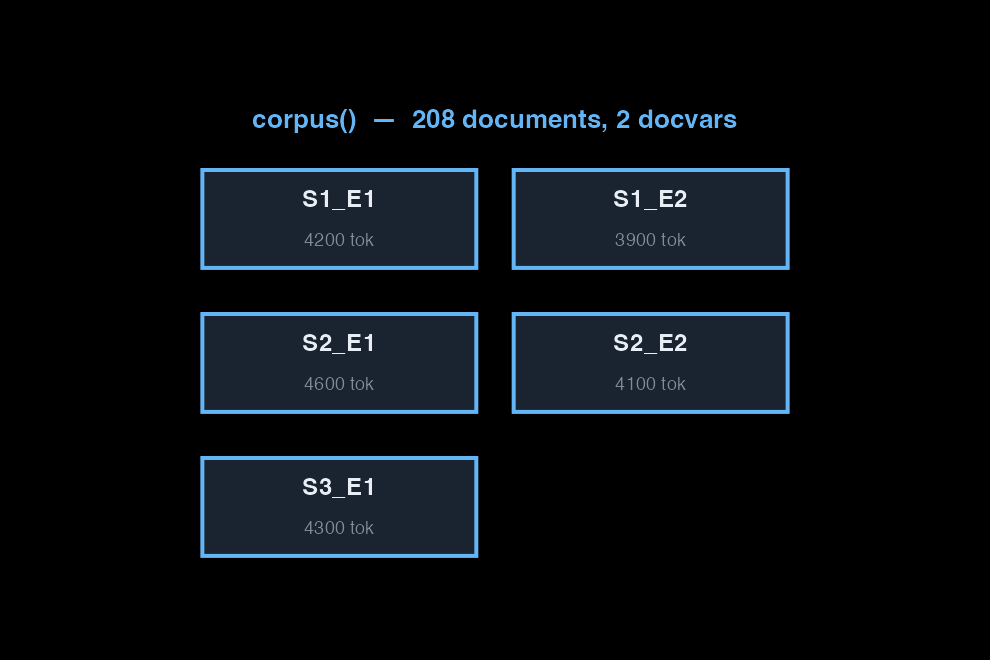
A corpus is text + docvars in one object — text under one column, episode metadata under others.
A quanteda corpus is text plus docvars in one object. Every column besides the text becomes a document-level variable.
Show / hide code
corpus.R
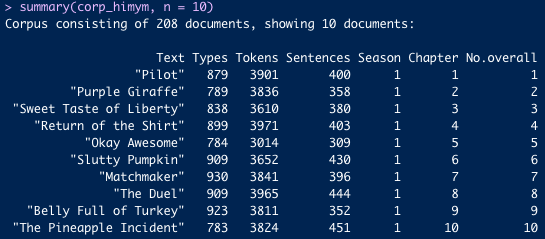
corp_himym<-corpus(scripts, docid_field ="doc_id", text_field ="text")docnames(corp_himym)<-paste0("S", scripts$season, "_E", scripts$episode)corp_himym#> Corpus consisting of 208 documents and 2 docvars.#> S1_E1 :#> ""x" " OLDER TED: Kids, I'm gonna tell y..."#> #> S1_E2 :#> ""x" " - OLDER TED: Okay, where was I? -..."#> #> S1_E3 :#> ""x" " S Sy Syn Sync Sync b OLDER TED: S..."#> #> S1_E4 :#> ""x" " OLDER TED: Kids, when you're sing..."#> #> S1_E5 :#> ""x" " OLDER TED: So, kids, would you li..."#> #> S1_E6 :#> ""x" " OLDER TED: You know how Aunt Robi..."#> #> [ reached max_ndoc ... 202 more documents ]summary(corp_himym, n =5)#> Corpus consisting of 208 documents, showing 5 documents:#> #> Text Types Tokens Sentences season episode#> S1_E1 879 3901 400 1 1#> S1_E2 789 3836 358 1 2#> S1_E3 838 3610 380 1 3#> S1_E4 899 3971 403 1 4#> S1_E5 784 3015 309 1 5
The first five episodes are around 4,000–5,000 tokens and 350–500 sentences each — consistent with a 22-minute sitcom script.
3. From corpus to tokens
Tokens break a document into units. Almost every preprocessing decision lives at this step.
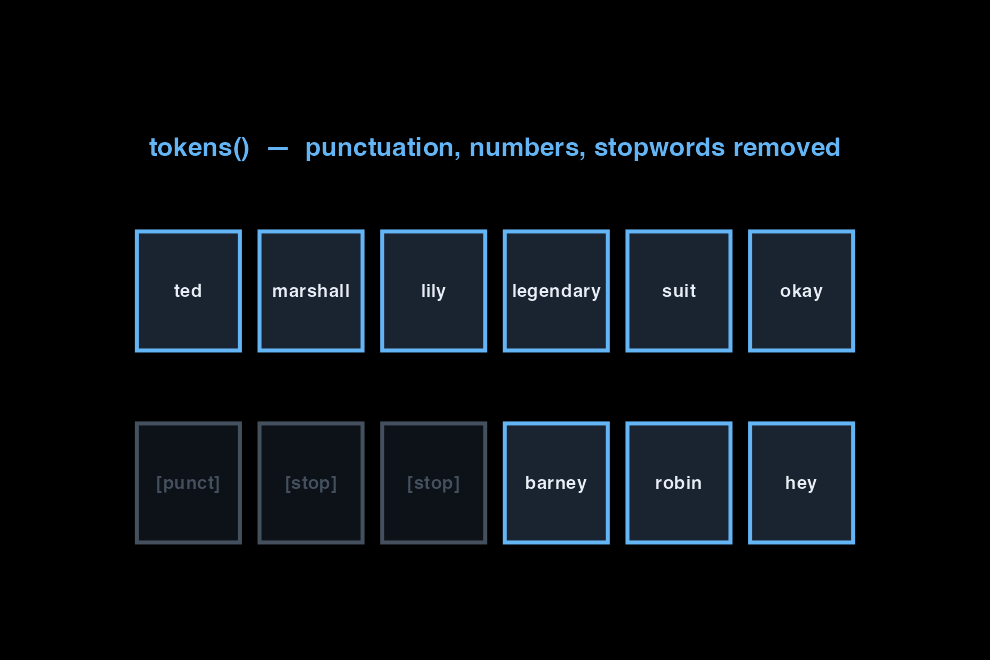
Tokenisation is where preprocessing decisions live. Punctuation off, numbers off, symbols off, lowercase, stopwords removed — order matters (always remove stopwords after lowercasing).
Show / hide code
tokens.R
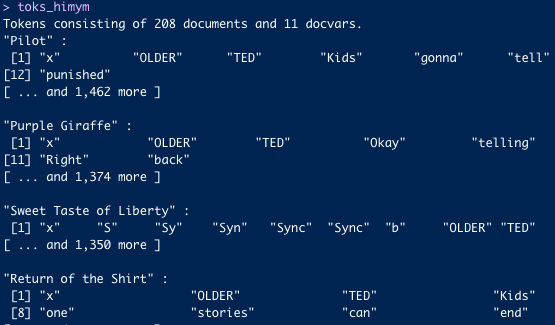
toks<-corp_himym|>tokens( remove_punct =TRUE, remove_numbers =TRUE, remove_symbols =TRUE)|>tokens_tolower()|>tokens_remove(stopwords("english"))toks#> Tokens consisting of 208 documents and 2 docvars.#> S1_E1 :#> [1] "x" "older" "ted" "kids" "gonna" #> [6] "tell" "incredible" "story" "story" "met" #> [11] "mother" "punished" #> [ ... and 1,464 more ]#> #> S1_E2 :#> [1] "x" "older" "ted" "okay" "telling" #> [6] "us" "met" "mom" "excruciating" "detail" #> [11] "right" "back" #> [ ... and 1,375 more ]#> #> S1_E3 :#> [1] "x" "s" "sy" "syn" "sync" "sync" "b" "older" "ted" #> [10] "one" "night" "met" #> [ ... and 1,351 more ]#> #> S1_E4 :#> [1] "x" "older" "ted" #> [4] "kids" "single" "looking" #> [7] "happily-ever-after" "one" "stories" #> [10] "can" "end" "way" #> [ ... and 1,481 more ]#> #> S1_E5 :#> [1] "x" "older" "ted" "kids" "like" "hear" "story" "time" "went" #> [10] "deaf" "even" "ask" #> [ ... and 1,140 more ]#> #> S1_E6 :#> [1] "x" "older" "ted" "know" "aunt" "robin's" #> [7] "big" "fan" "halloween" "always" "dressing" "crazy" #> [ ... and 1,405 more ]#> #> [ reached max_ndoc ... 202 more documents ]
Preprocessing is a modeling choice, not a default. Removing stopwords helps when content words are what you care about; it hurts when style is the question. Lowercasing erases proper-noun information. There is no universally correct setting — it depends on the question.
4. From tokens to a dfm
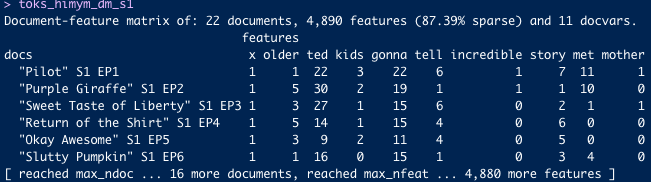
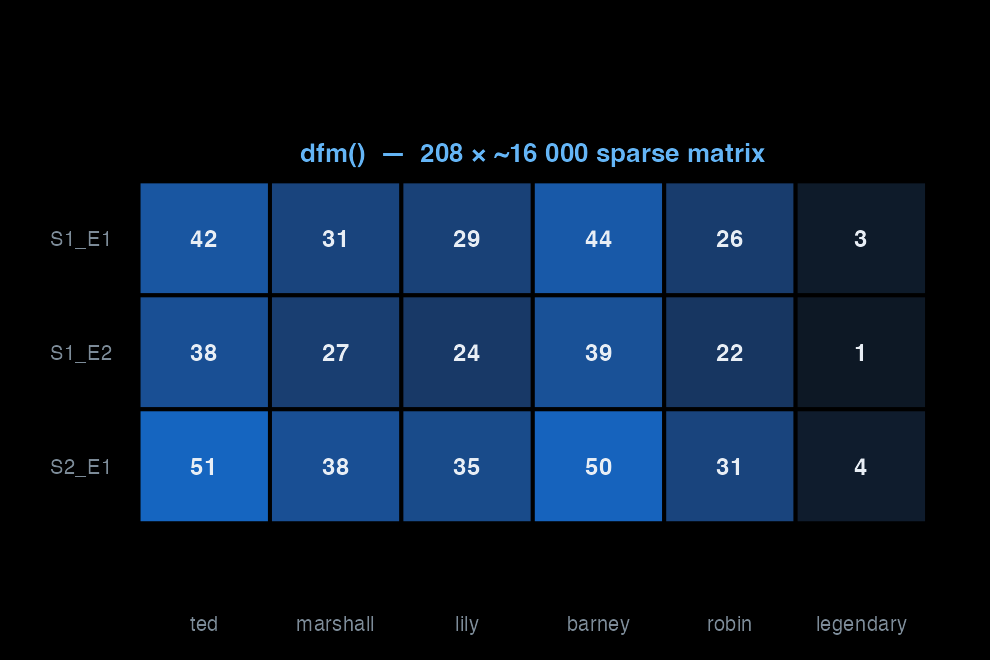
The DFM is the workhorse: rows = documents, columns = features, cells = counts.
Every quanteda pipeline you read in the wild is a variation on these five steps. The interesting decisions live at steps 2 and 3.
The pipeline, in motion
Scroll to see the three objects — corpus, tokens, DFM — and what each transformation discards.
corpus() wraps raw text and metadata into one object. Each document is a row: the text in one column, season and episode number in the others. No words have been touched yet.
tokens() breaks each document into units and applies preprocessing rules. Punctuation, numbers, and stopwords are removed at this step. The greyed tiles are discarded — they never enter the matrix.
dfm() counts how often each remaining feature appears in each document. Rows are documents, columns are features, cells are counts. Most cells are zero — this is a sparse matrix.
Top features
Show / hide code
topfeatures.R
topfeatures(dfm_himym, n =25)#> just oh know ted like okay yeah right #> 4553 4023 3646 3006 2847 2716 2632 2614 #> get one go well hey barney gonna got #> 2563 2190 2105 2083 2037 2028 2000 1898 #> now robin can marshall want lily really think #> 1856 1835 1809 1807 1766 1745 1654 1525 #> going #> 1494
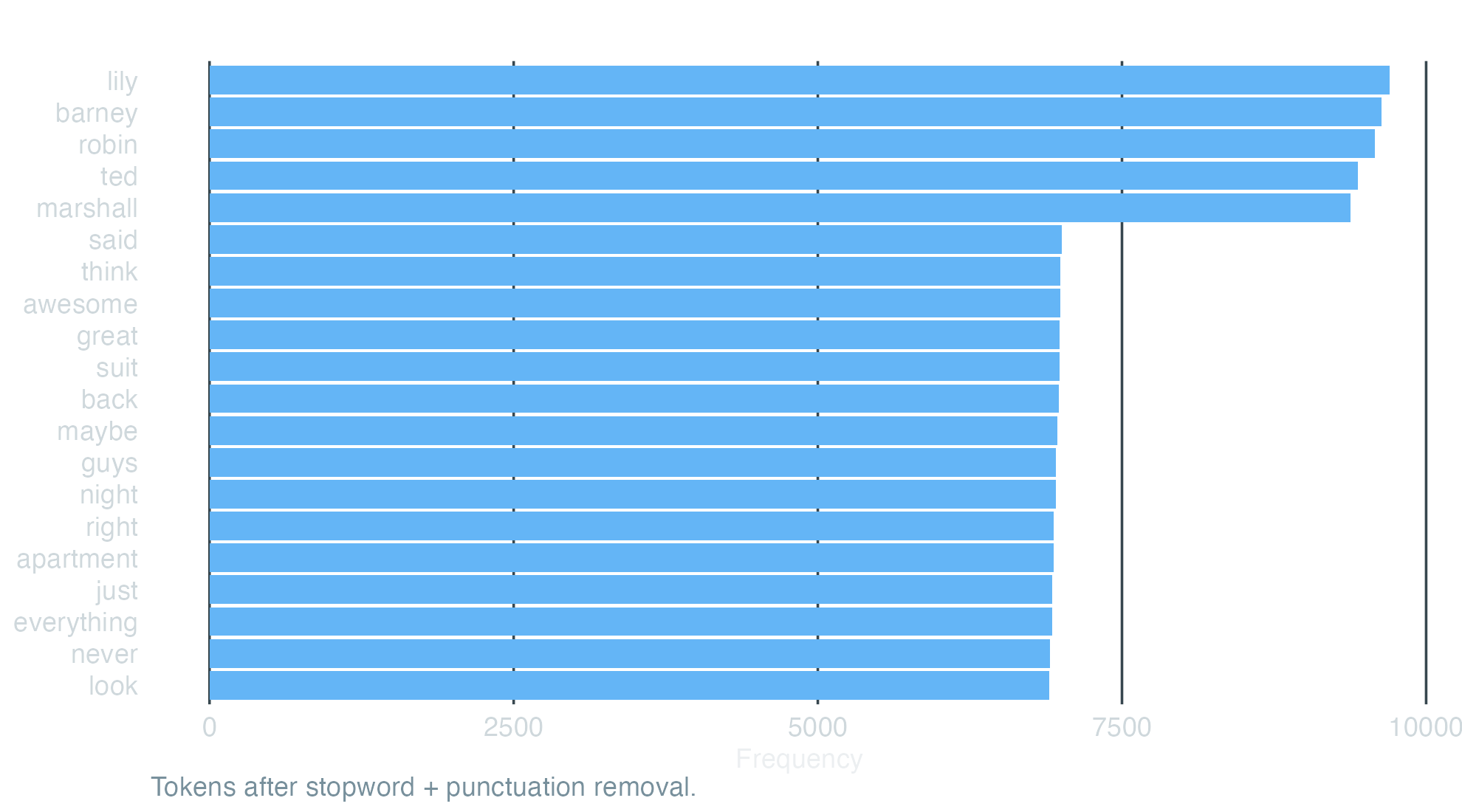
Character names dominate, as you would expect from a multi-character sitcom. quanteda.textstats gives the same view as a tibble we can plot.
Show / hide code
freq-plot.R
freq<-textstat_frequency(dfm_himym, n =20)ggplot(freq, aes(x =reorder(feature, frequency), y =frequency))+geom_col(fill ="#64B5F6")+coord_flip()+labs( x =NULL, y ="Frequency", title ="Top 20 tokens — HIMYM corpus (208 episodes)", caption ="Tokens after stopword + punctuation removal.")+theme_dark_transparent()+theme(panel.grid.major.y =element_blank())
KWIC pulls every occurrence of a target word with its surrounding context — the single most useful sanity check in the package. The window controls how many tokens of context show on each side.
Show / hide code
kwic-legendary.R
kwic(toks, pattern ="legendary", window =3)|>head(8)#> Keyword-in-context with 8 matches. #> [S1_E3, 62] meet ladies gonna | legendary | phone-five older ted #> [S1_E3, 148] peace suckers right | legendary | plan first gotta #> [S1_E3, 216] sketchy trust gonna | legendary | say legendary okay #> [S1_E3, 218] gonna legendary say | legendary | okay liberal word #> [S1_E3, 222] okay liberal word | legendary | building igloo central #> [S1_E3, 228] central park gonna | legendary | snowsuit ted ted #> [S1_E3, 418] us philly gonna | legendary | man wish guys #> [S1_E3, 874] half word dairy | legendary | legendary sounds awesome
Show / hide code
kwic-suit.R
kwic(toks, pattern ="suit", window =3)|>head(8)#> Keyword-in-context with 8 matches. #> [S1_E1, 128] meet bar minutes | suit | hey suit just #> [S1_E1, 130] minutes suit hey | suit | just say suit #> [S1_E1, 133] suit just say | suit | wish put suit #> [S1_E1, 136] suit wish put | suit | one time blazer #> [S1_E1, 182] lose goatee go | suit | wearing suit lesson #> [S1_E1, 184] go suit wearing | suit | lesson two get #> [S1_E1, 188] lesson two get | suit | suits cool exhibit #> [S1_E1, 422] exactly guy even | suit | plus marshall's found
A 3-token window is enough to verify that the matches are the senses you expect.
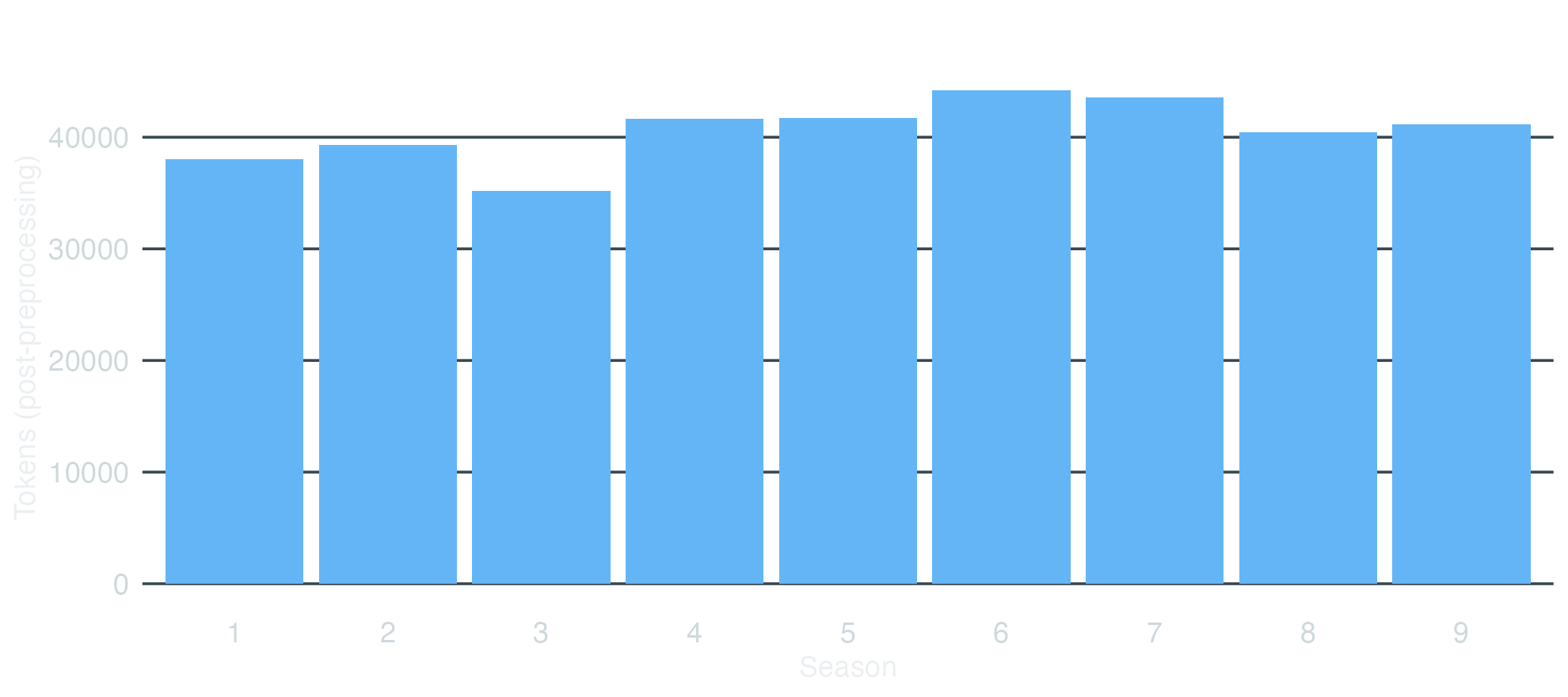
Token volume per season
Show / hide code
tokens-by-season.R
tokens_by_season<-ntoken(dfm_himym)|>tibble::enframe(name ="doc", value ="tokens")|>mutate(season =scripts$season)|>group_by(season)|>summarise(total_tokens =sum(tokens), episodes =n(), .groups ="drop")tokens_by_season#> # A tibble: 9 x 3#> season total_tokens episodes#> <int> <int> <int>#> 1 1 31219 22#> 2 2 31340 22#> 3 3 28147 20#> 4 4 33433 24#> 5 5 36307 24#> 6 6 34496 24#> 7 7 35869 24#> 8 8 36962 24#> 9 9 41066 24ggplot(tokens_by_season, aes(x =factor(season), y =total_tokens))+geom_col(fill ="#64B5F6")+labs(x ="Season", y ="Tokens (post-preprocessing)", title ="Token volume per season")+theme_dark_transparent()+theme(panel.grid.major.x =element_blank())
Episode clustering (Season 1)
Similarity
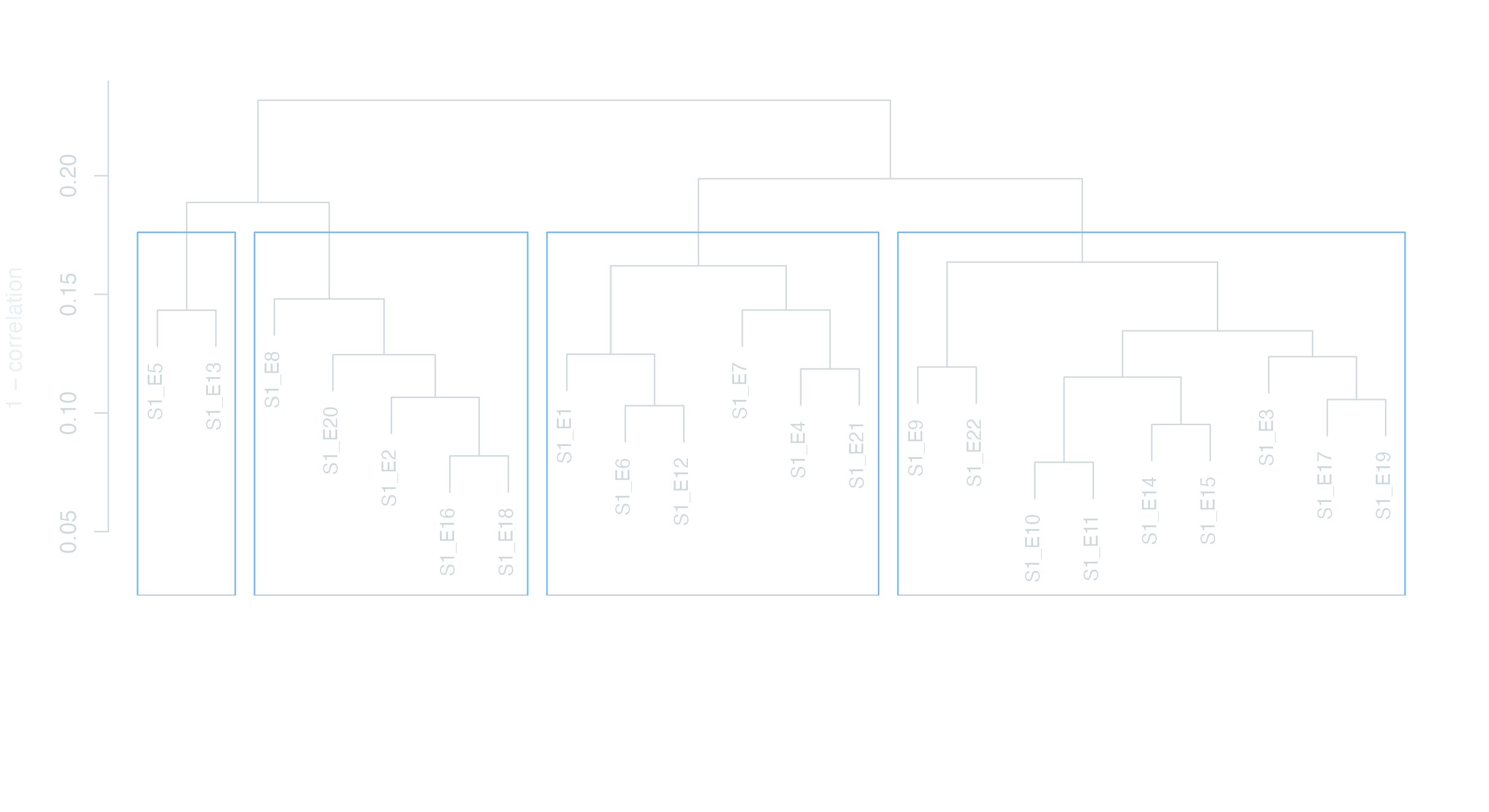
textstat_simil() computes pairwise similarity between documents. Most useful at the season level — across 208 episodes the matrix gets unwieldy, but for the 22 episodes of Season 1 we can read the structure off a dendrogram. Cluster the similarity matrix with hclust(), plot as a tree.
Show / hide code
similarity-s1.R
dfm_s1<-dfm_subset(dfm_himym, scripts$season==1)simil_s1<-textstat_simil(dfm_s1, method ="correlation")clust_s1<-hclust(as.dist(1-as.matrix(simil_s1)))par_dark(); par(mar =c(8, 4, 3, 2))plot(clust_s1, main ="HIMYM Season 1 — episode similarity", xlab ="", sub ="", ylab ="1 − correlation", cex =0.85)rect.hclust(clust_s1, k =4, border ="#64B5F6")
Distance
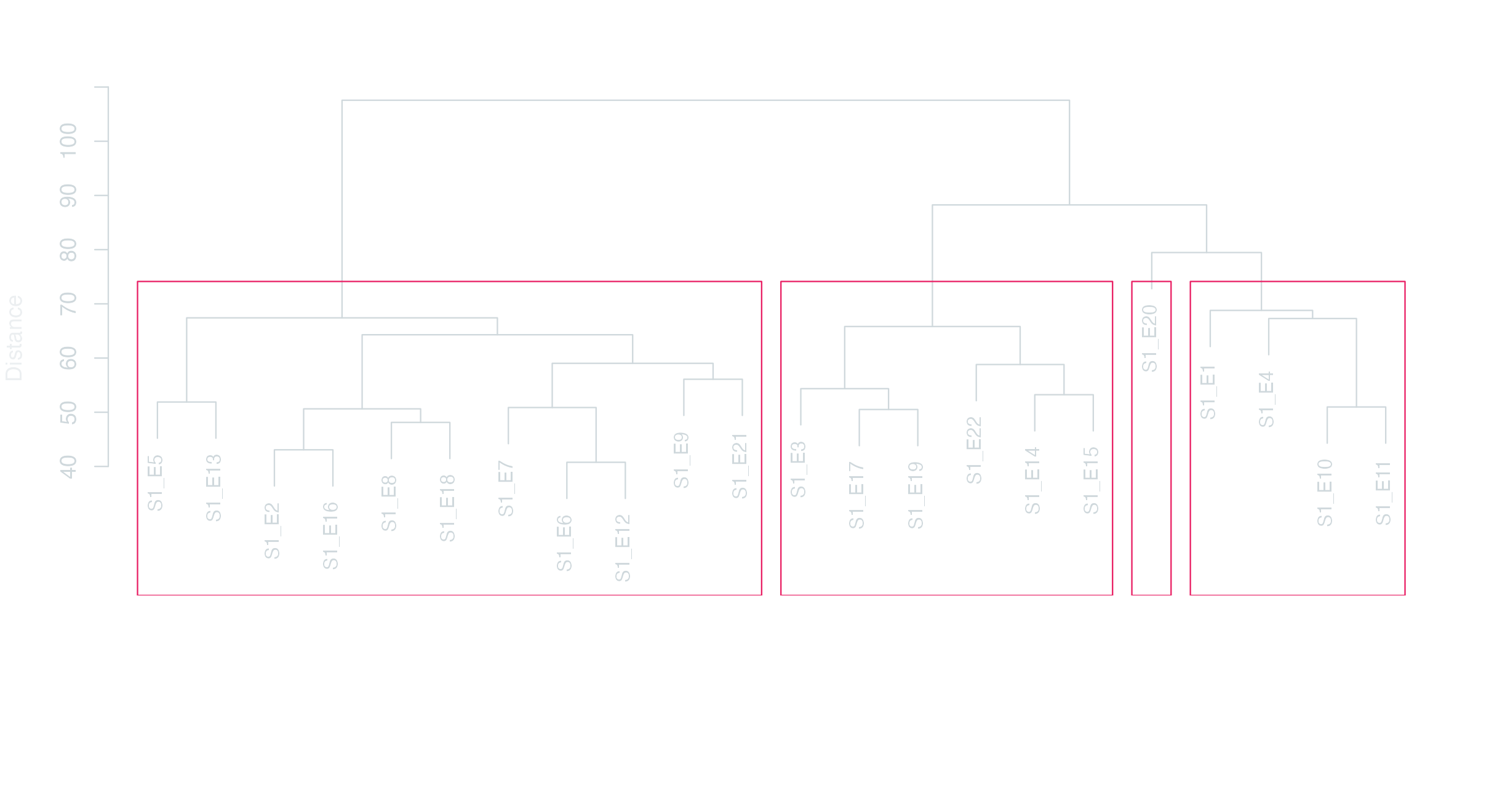
textstat_dist() is the inverse — how different are episodes? Same dendrogram approach, different metric.
Show / hide code
distance-s1.R
dist_s1<-textstat_dist(dfm_s1, method ="euclidean")clust_dist_s1<-hclust(as.dist(as.matrix(dist_s1)))par_dark(); par(mar =c(8, 4, 3, 2))plot(clust_dist_s1, main ="HIMYM Season 1 — episode distance (Euclidean)", xlab ="", sub ="", ylab ="Distance", cex =0.85)rect.hclust(clust_dist_s1, k =4, border ="#E91E63")
Principal characters by season
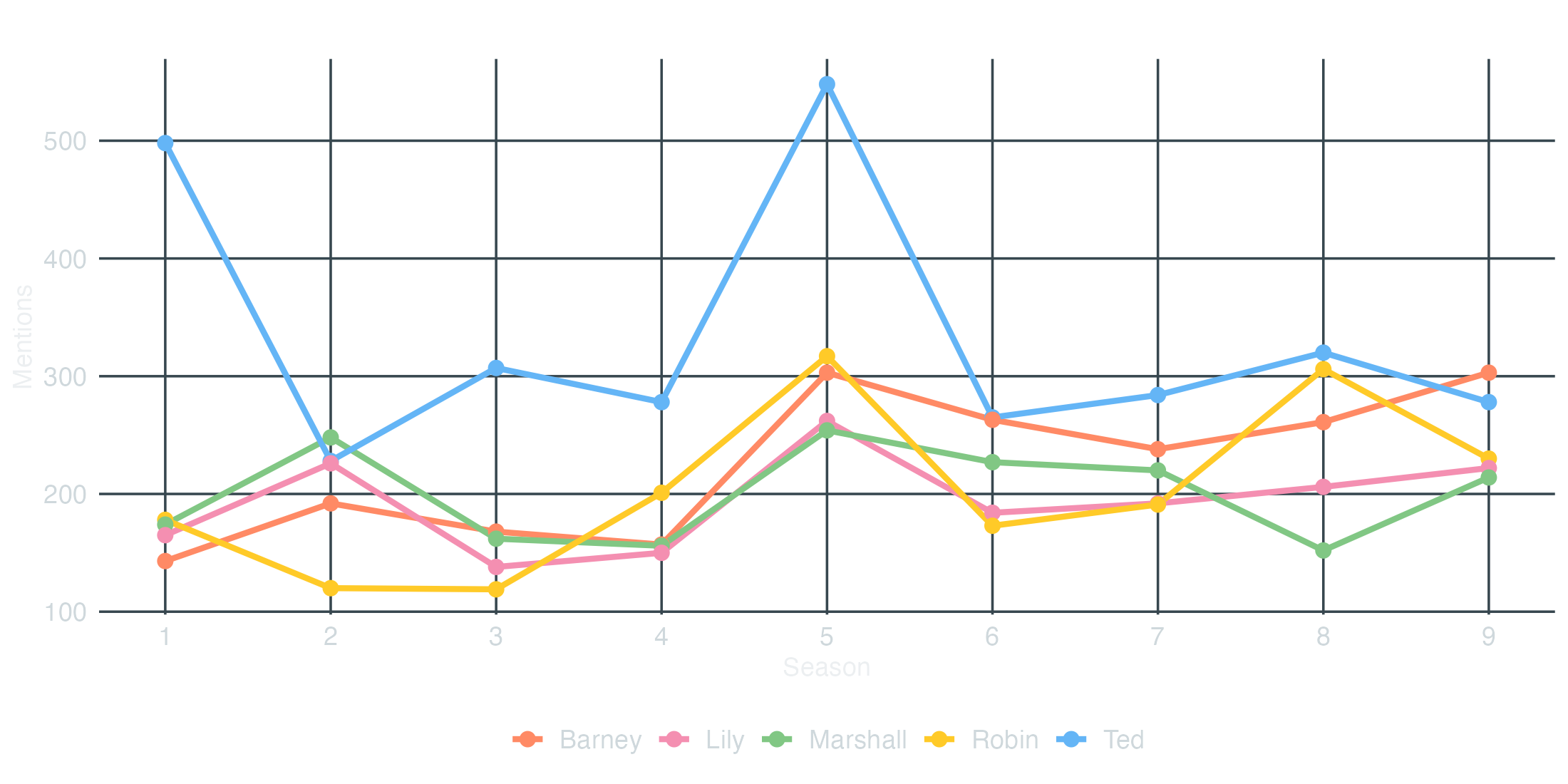
How often each principal is named per season. We tokenise the corpus without lowercasing so we can match capitalised first names directly, keep only the principal cast, group by season, and turn it into a DFM.
Show / hide code
principal-frequency.R
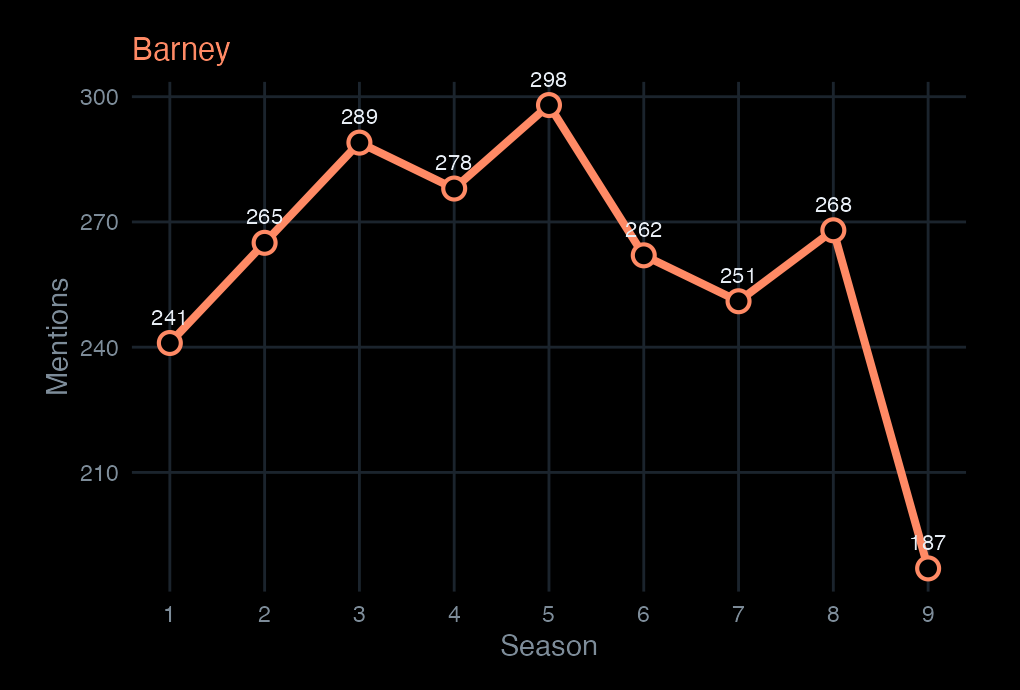
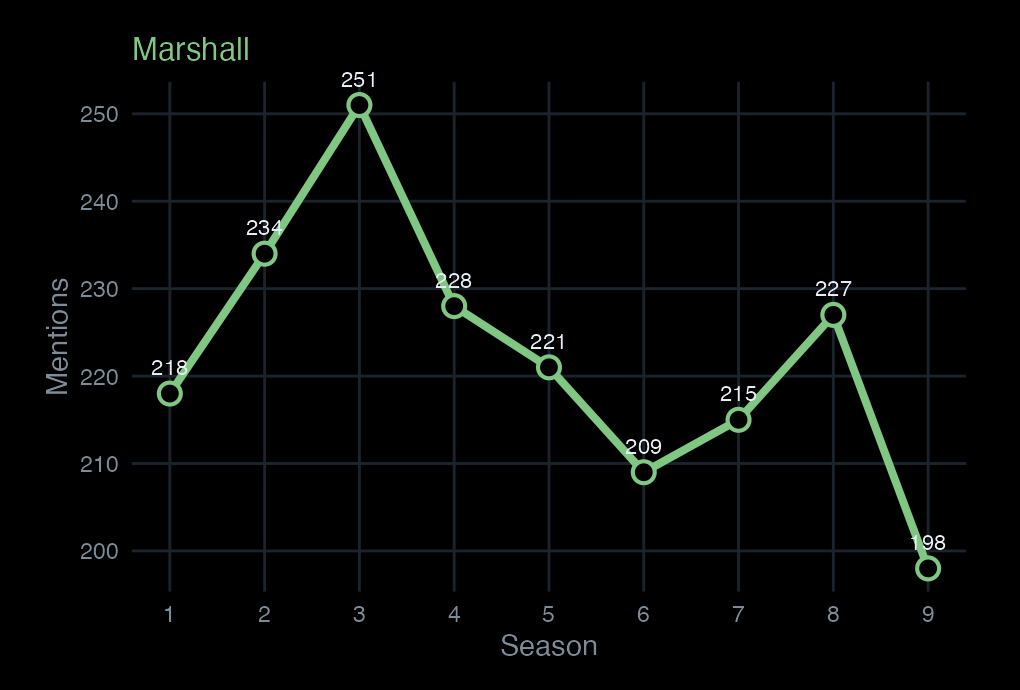
docvars(corp_himym, "season")<-scripts$seasontoks_named<-corp_himym|>tokens(remove_punct =TRUE, remove_numbers =TRUE, remove_symbols =TRUE)dfm_principals<-toks_named|>tokens_keep(principals)|>tokens_group(groups =season)|>dfm()freq_principals<-textstat_frequency(dfm_principals, groups =1:9)|>as_tibble()|>mutate(season =as.integer(group), character =str_to_title(feature))freq_principals|>head(10)#> # A tibble: 10 x 7#> feature frequency rank docfreq group season character#> <chr> <dbl> <dbl> <dbl> <chr> <int> <chr> #> 1 ted 498 1 1 1 1 Ted #> 2 robin 178 2 1 1 1 Robin #> 3 marshall 174 3 1 1 1 Marshall #> 4 lily 165 4 1 1 1 Lily #> 5 barney 143 5 1 1 1 Barney #> 6 marshall 248 1 1 2 2 Marshall #> 7 ted 228 2 1 2 2 Ted #> 8 lily 226 3 1 2 2 Lily #> 9 barney 192 4 1 2 2 Barney #> 10 robin 120 5 1 2 2 Robinggplot(freq_principals,aes(x =season, y =frequency, color =character, group =character))+geom_line(linewidth =1.3)+geom_point(size =2.8)+scale_color_manual(values =principal_colors)+scale_x_continuous(breaks =1:9)+labs(x ="Season", y ="Mentions", title ="Mentions of principal characters by season", color =NULL)+theme_dark_transparent()+theme(legend.position ="bottom", panel.grid.minor =element_blank())
Character arcs, in motion
Scroll to read each character’s presence across the nine seasons.
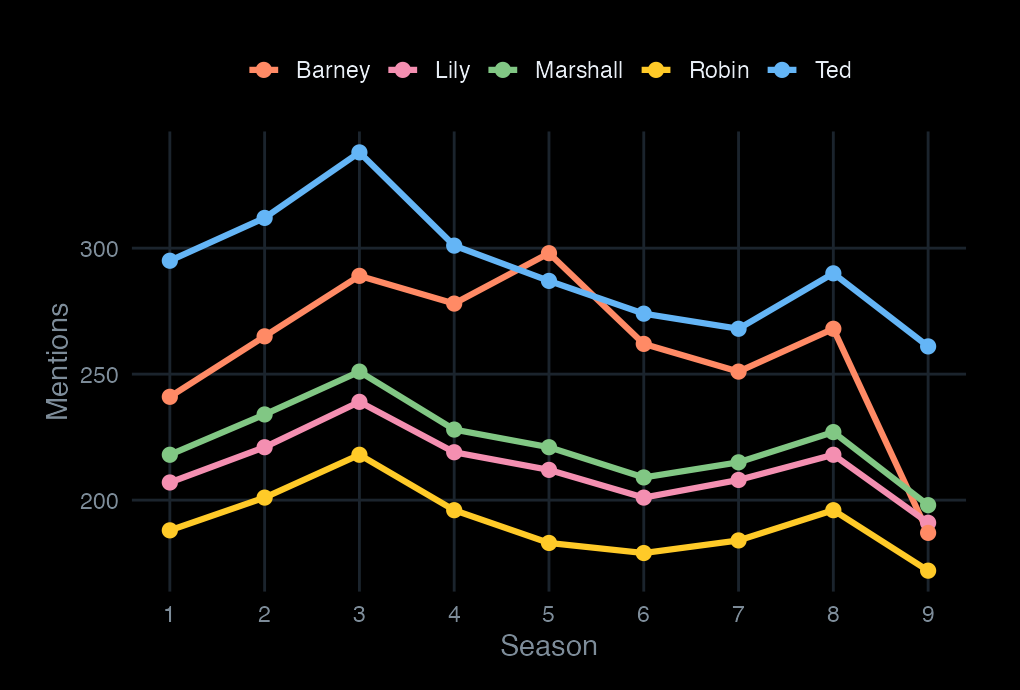
Five characters, nine seasons. This is what a frequency count measures: presence in dialogue, not screen time or plot centrality.
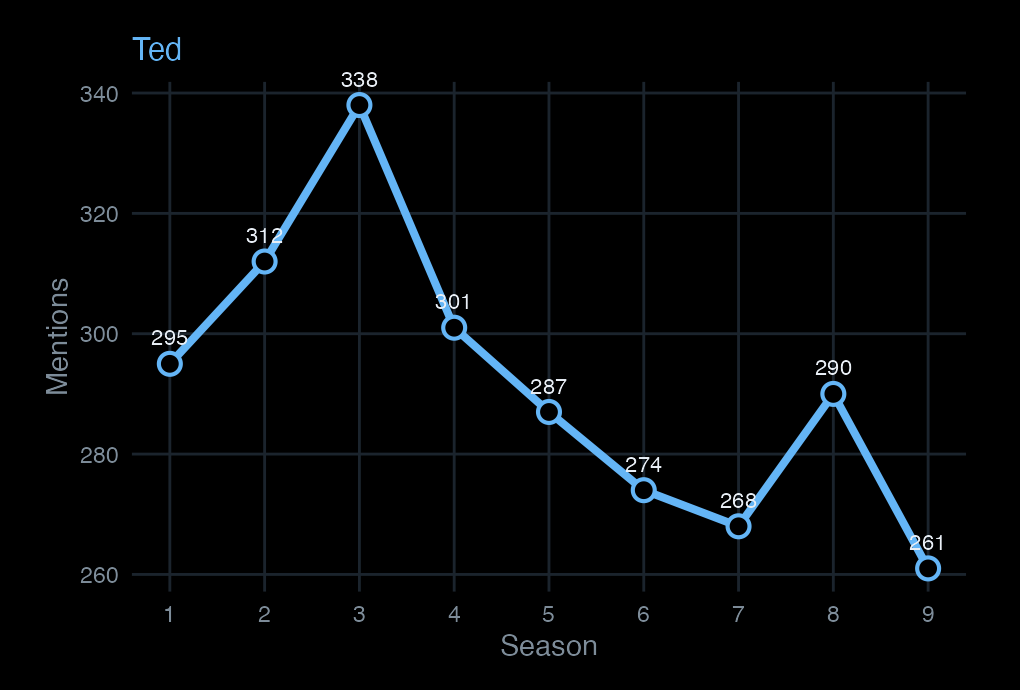
Ted is the narrator’s subject — consistently the most-named character, with a mild dip in Seasons 6–7 where secondary storylines expand.
Barney rises through Season 5 (the year he marries) and drops sharply in Season 9 — the final season compresses his arc into a single weekend.
Marshall runs steady throughout. His mention frequency correlates with the show’s ensemble balance — when Marshall is absent from a storyline, the count drops; when he anchors one, it spikes.
Character wordclouds
Principal cast
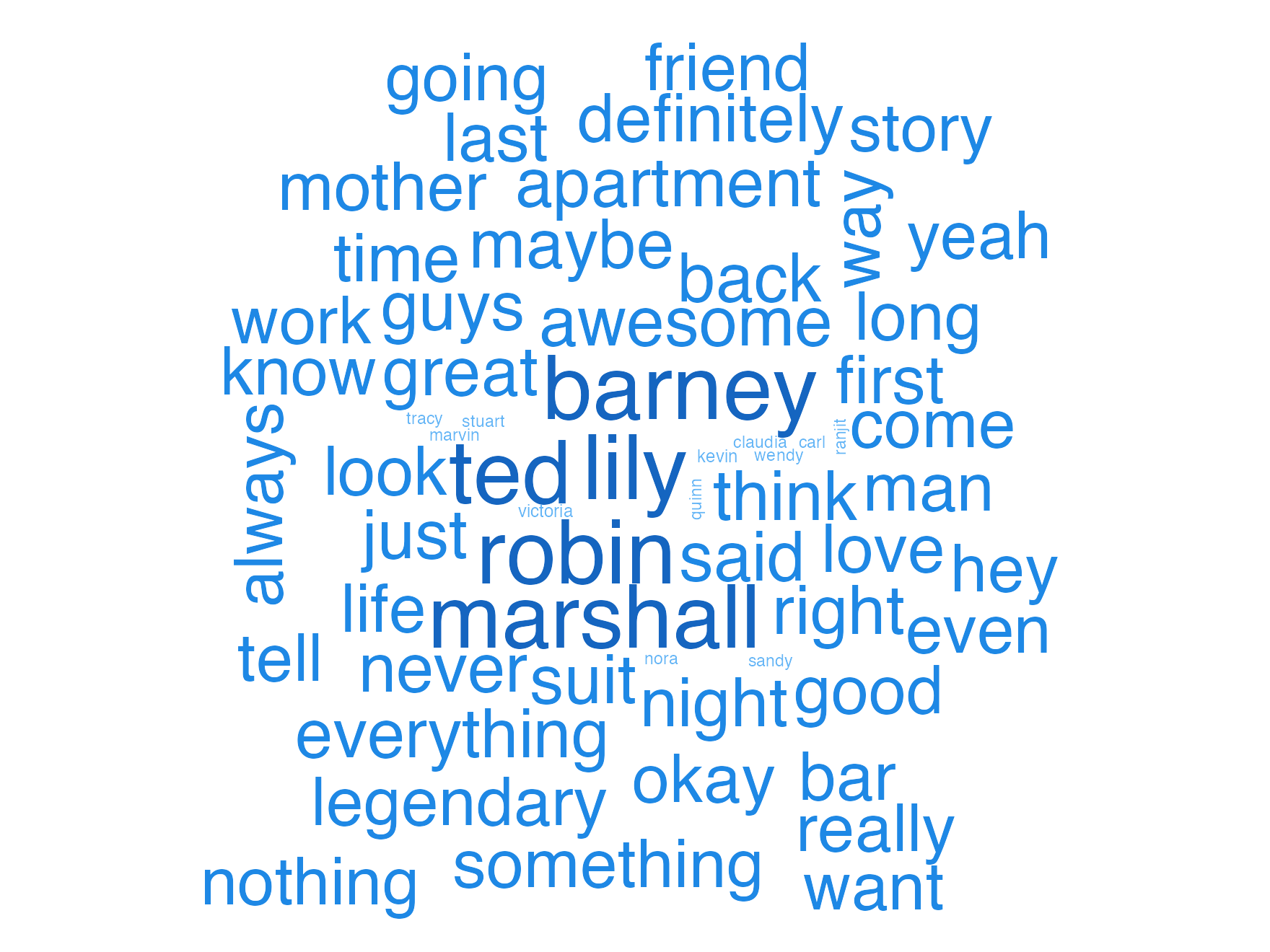
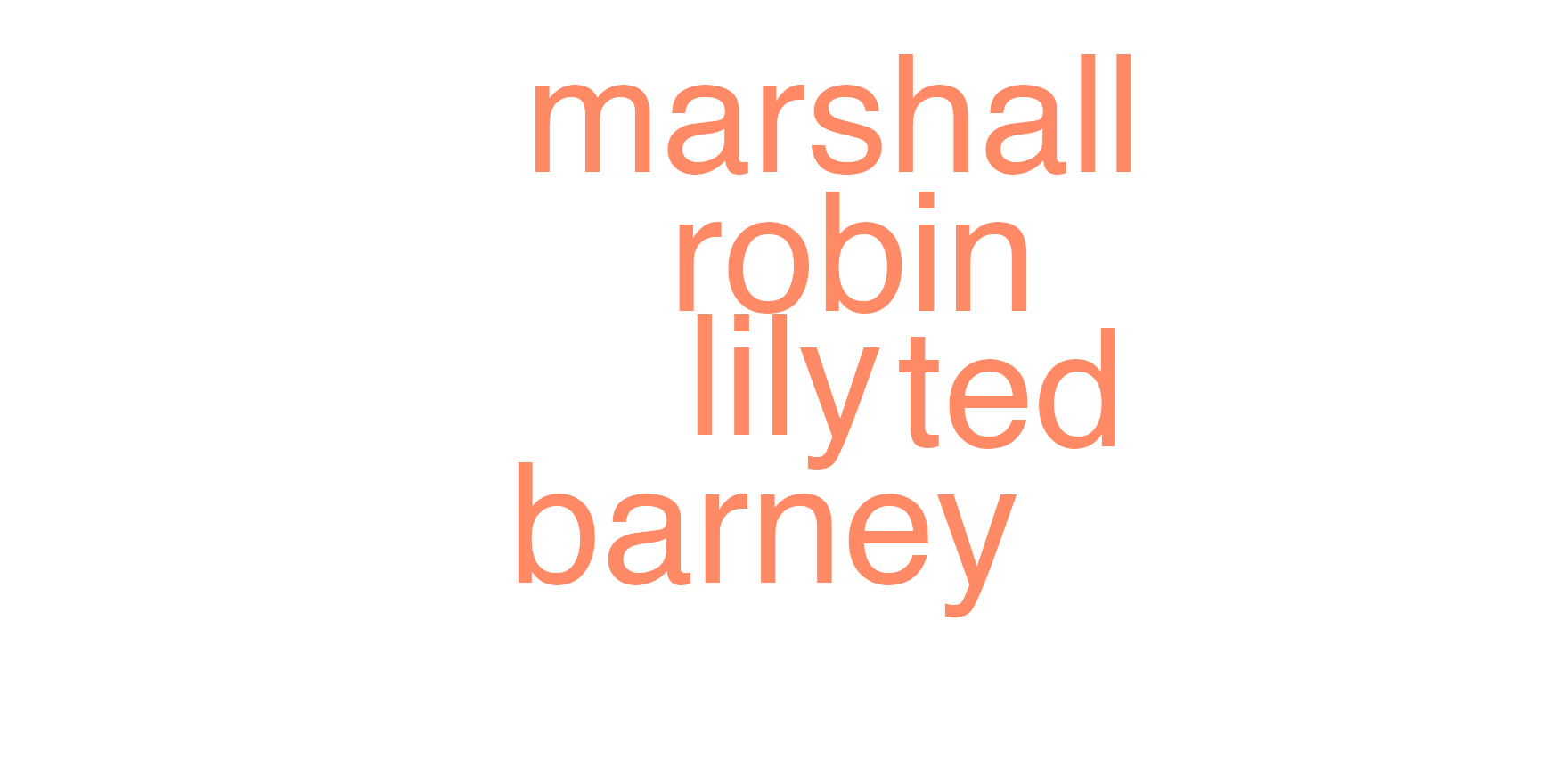
A wordcloud restricted to the five principals: size scales with how often each is named across the whole show.
Show / hide code
principal-wordcloud.R
toks_principal_only<-toks_named|>tokens_keep(principals)dfm_principal_only<-dfm(toks_principal_only)set.seed(101)par_dark()textplot_wordcloud(dfm_principal_only, rotation =0.25, min_size =1.6, max_size =9, color =unname(principal_colors))
Secondary cast
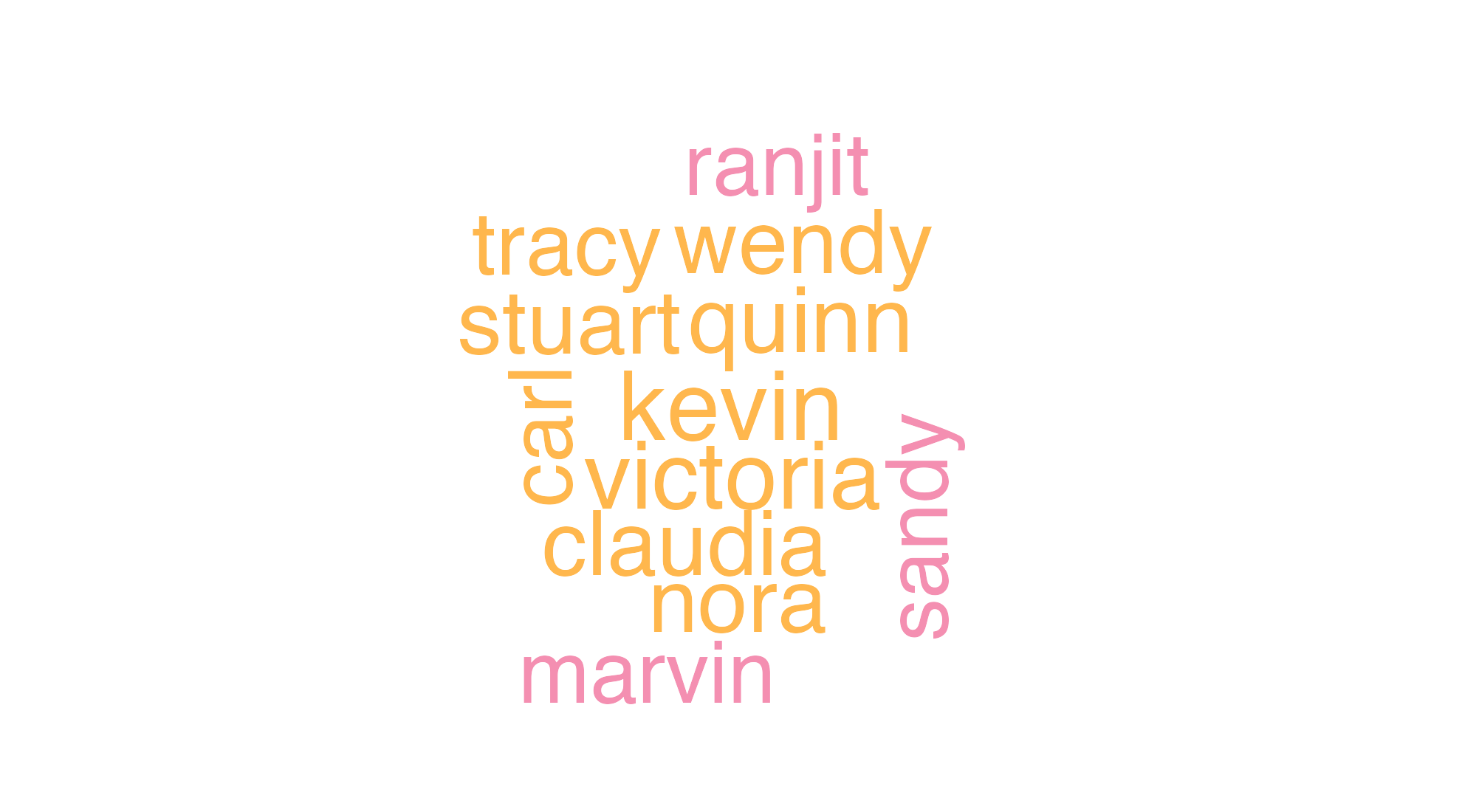
Secondary characters: a pre-curated set of named recurring characters from across the show, with the principals removed. We need a list of names — the original workshop scraped them from Wikipedia; here we hardcode a representative set so the chunk is reproducible without a network call.
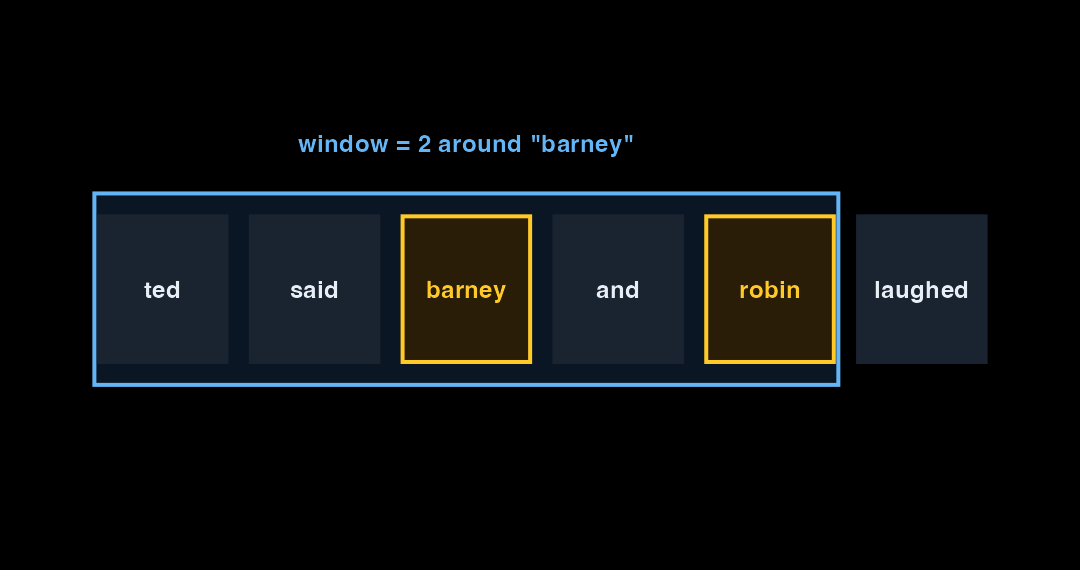
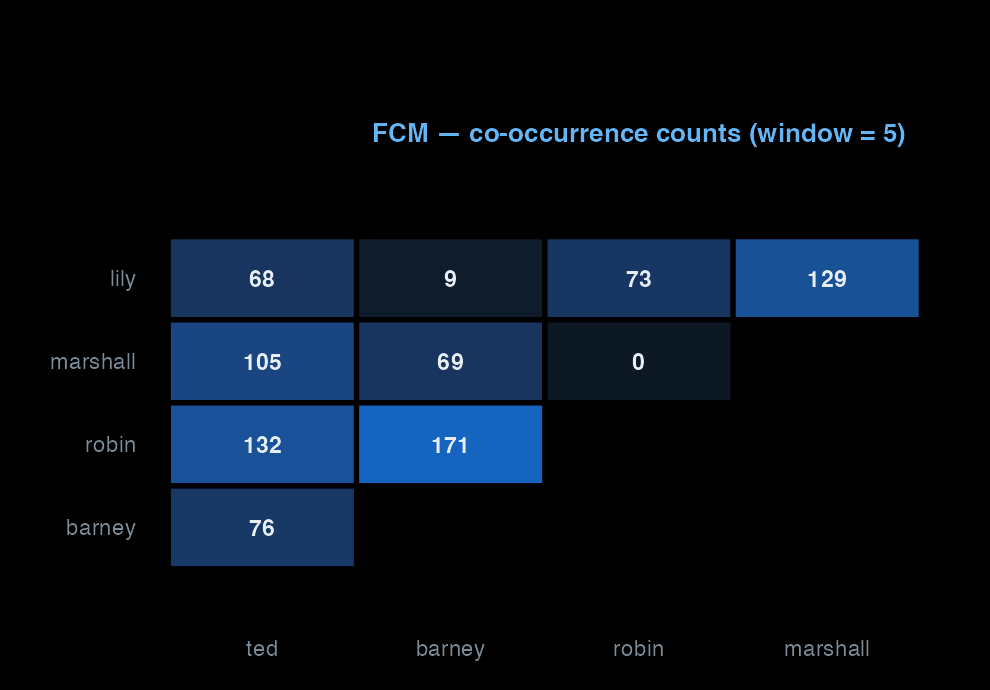
To see who shares scenes with whom, we need a feature co-occurrence matrix (FCM). The window controls what counts as “near” — a 5-token window is the workshop default. We restrict to a small fixed character vocabulary so the matrix is small and the network plots are legible.
Show / hide code
character-fcm.R
character_vocab<-str_to_lower(c(principals, secondary))toks_chars<-toks_named|>tokens_tolower()|>tokens_keep(character_vocab)fcm_chars<-fcm(toks_chars, context ="window", window =5, tri =FALSE)# `topfeatures()` was deprecated for FCM in quanteda 4.0 — use rowSums + sortchar_totals<-sort(rowSums(fcm_chars), decreasing =TRUE)dim(fcm_chars)#> [1] 34 34head(char_totals, 10)#> ted barney robin marshall lily zoey stella marvin #> 28441 19072 17484 17099 16609 1464 1435 1251 #> victoria james #> 1056 891
Top 30 characters
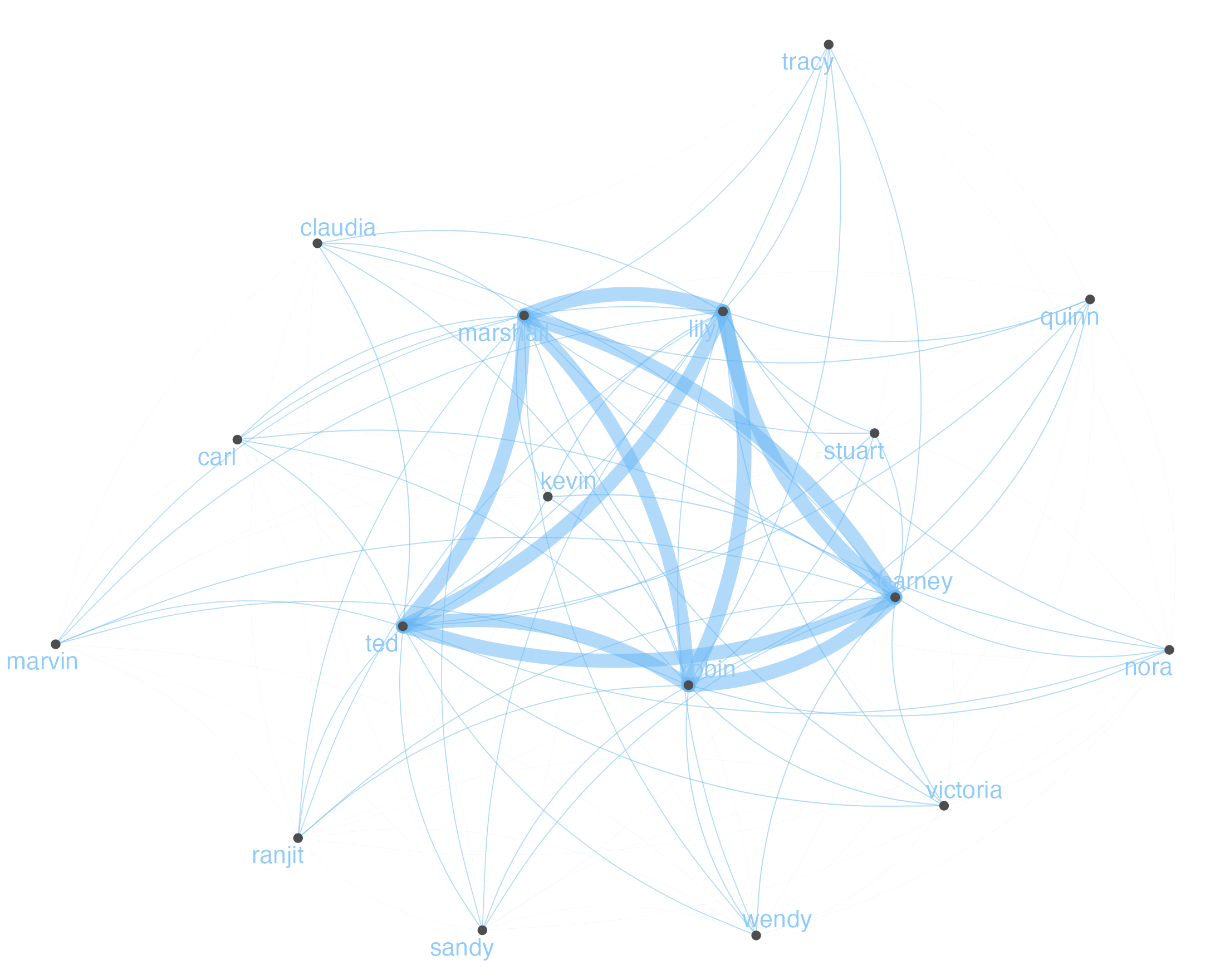
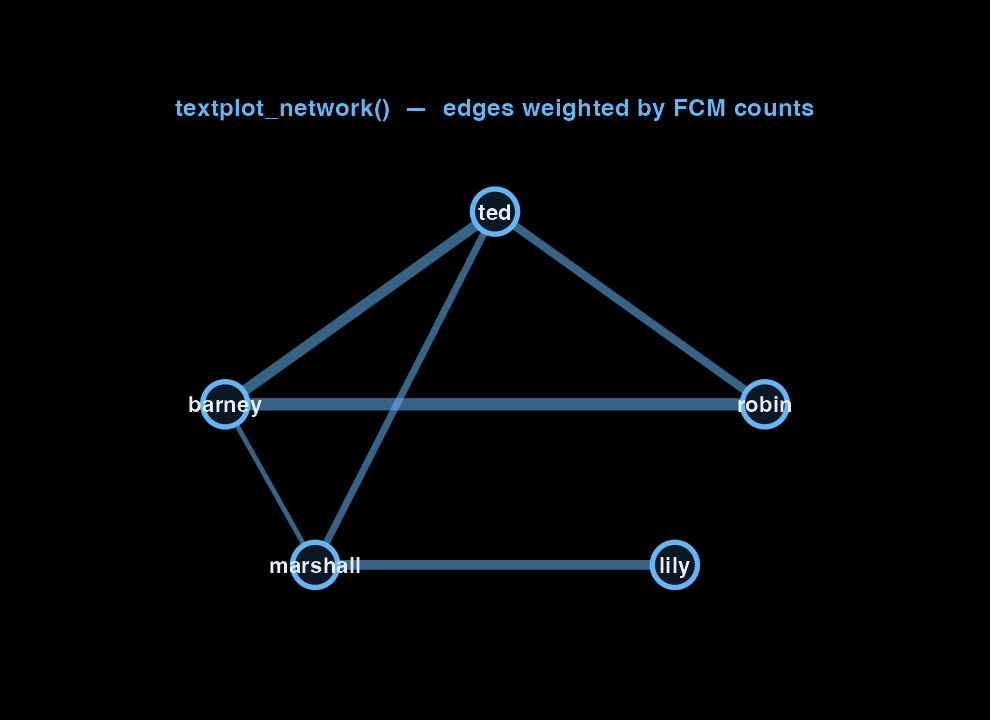
textplot_network() lays the FCM out as a graph: nodes are characters, edges weighted by co-occurrence.
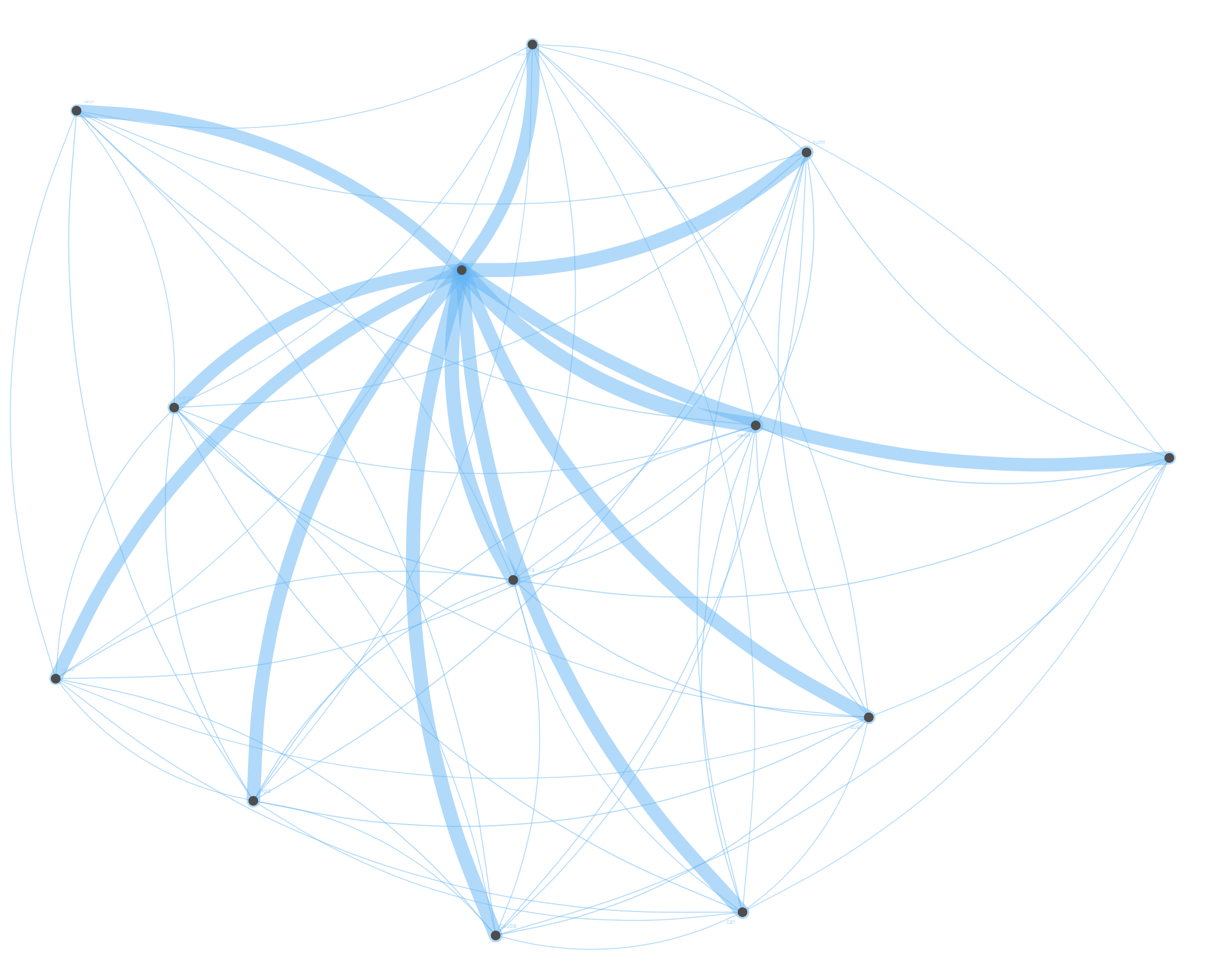
A different question: who shows up in scenes with Ted? We remove the other principals from the corpus first, build a fresh FCM, and weight Ted’s label larger so the centre is unambiguous.
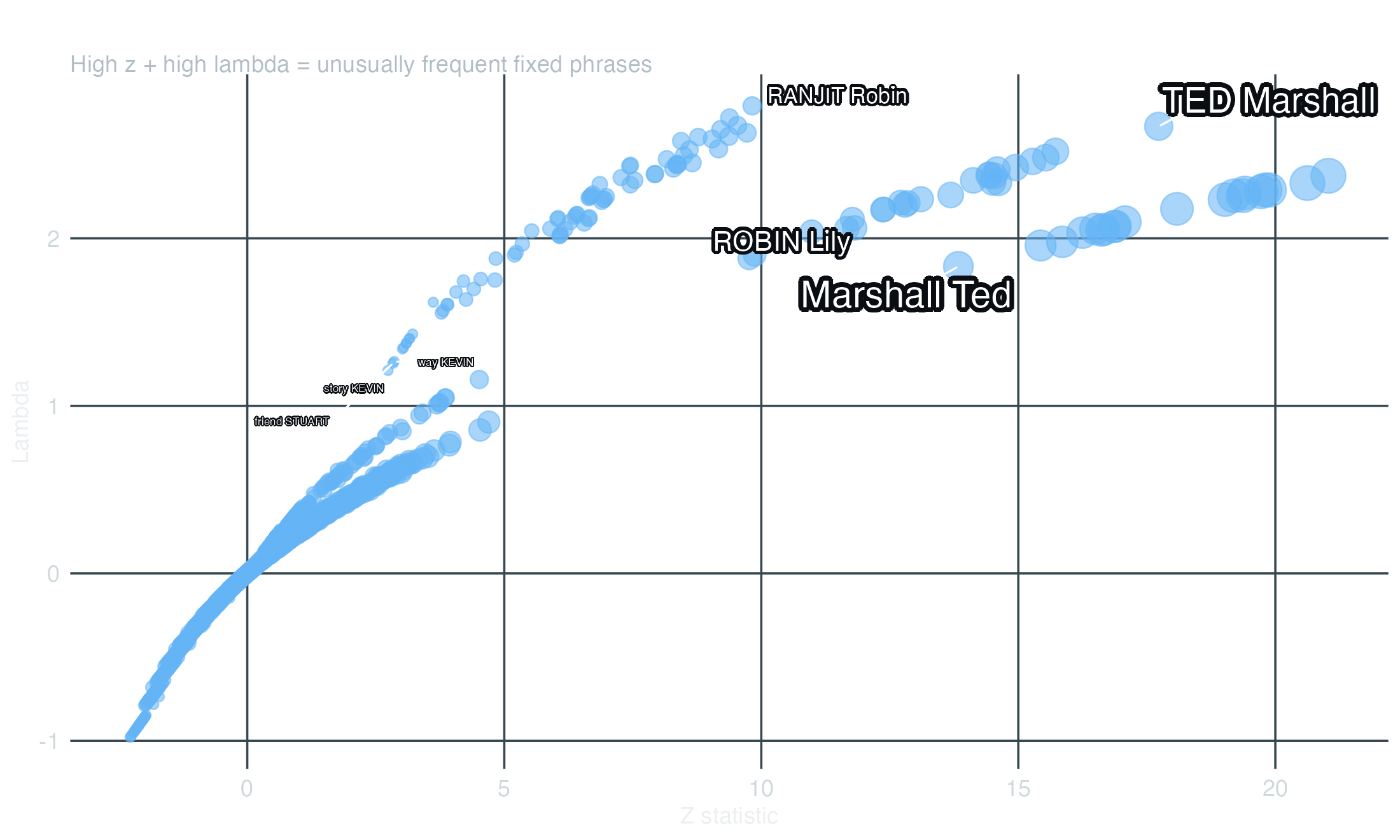
textstat_collocations() finds adjacent fixed-length phrases that appear together more than chance — multi-word expressions, named entities, catch-phrases. We run it on Season 1 to keep the output focused.
Show / hide code
collocations.R
toks_s1<-corp_himym|>corpus_subset(scripts$season==1)|>tokens(padding =TRUE)|>tokens_remove(stopwords("english"))colls_s1<-textstat_collocations(toks_s1, tolower =FALSE, min_count =5)colls_s1|>as_tibble()|>arrange(desc(z))|>head(15)#> # A tibble: 15 x 6#> collocation count count_nested length lambda z#> <chr> <int> <int> <dbl> <dbl> <dbl>#> 1 right now 35 0 2 5.92 20.4#> 2 getting married 19 0 2 5.44 16.7#> 3 party number 18 0 2 5.50 16.4#> 4 number three 15 0 2 6.06 15.7#> 5 get married 26 0 2 4.33 15.5#> 6 best friend 12 0 2 5.82 14.3#> 7 met Ted 13 0 2 4.96 13.5#> 8 MUSIC PLAYING 17 0 2 9.26 13.4#> 9 two months 12 0 2 4.92 13.4#> 10 years ago 9 0 2 6.25 13.2#> 11 rain dance 9 0 2 7.41 12.6#> 12 last night 13 0 2 4.44 12.6#> 13 Uncle Marshall 10 0 2 6.58 12.5#> 14 high school 11 0 2 8.51 12.4#> 15 check plus 7 0 2 7.80 12.0
The lambda column is the log-ratio of observed-to-expected co-occurrence; z is the standardised score. Plotting them surfaces the phrases that are both frequent and unusually so:
Show / hide code
collocations-plot.R
colls_df<-as_tibble(colls_s1)|># Strip non-ASCII glyphs from collocation labels — emoji, smart-quotes, em-# dashes etc. fall through to placeholder boxes ("U+2024") in the rendered# PNG because ragg's bundled fonts do not carry those code points.mutate(collocation =gsub("[^\\x20-\\x7E]", "", collocation, perl =TRUE))|>filter(nchar(collocation)>0)ggplot(colls_df, aes(x =z, y =lambda))+geom_point(aes(size =count), color ="#64B5F6", alpha =0.55)+geom_text_repel( data =colls_df|>filter(z>12),aes(label =collocation, size =count), color ="#ffffff", bg.color ="#0a0d12", bg.r =0.18, max.overlaps =18, box.padding =0.45, seed =7)+scale_size_continuous(range =c(2, 8), guide ="none")+labs(x ="Z statistic", y ="Lambda", title ="HIMYM Season 1 — multi-word collocations", subtitle ="High z + high lambda = unusually frequent fixed phrases")+theme_dark_transparent()
The network, in motion
Scroll to see how co-occurrence builds from tokens to edges.
At each token position, the FCM counts every other character that appears within the window. The gold tokens fall inside the window — each pair increments a cell in the matrix.
Repeat that count across 208 episodes, every token position, every character pair: the result is a matrix of co-occurrence counts. A high cell value means those two characters appear in dialogue near each other often.
textplot_network() converts the FCM into a graph. Edge thickness scales with the cell value. The five principals cluster at the centre; edge weight makes the strongest relationships visible without looking at the matrix.
Appendix — spaCy / spaCyr (POS tagging)
The original workshop also ran spaCyr — an R wrapper around the Python spaCy package — to tag every token as a noun, verb, adjective, or proper noun, then built an adjective wordcloud and an adjective frequency line plot per season. That section is not re-executed here because spaCyr requires a Python environment plus the en_core_web_sm model — a heavy dependency to ask of every site build.
Show / hide code
spacy-demo.R
library(spacyr)spacy_install()spacy_initialize(model ="en_core_web_sm")# Parse the whole corpus — pos column gets the part-of-speech tagparsed<-spacy_parse(scripts, tag =TRUE)# Keep adjectives only, then drop noiseadjectives<-parsed|>filter(pos=="ADJ")|>pull(lemma)|>unique()toks_adj<-corp_himym|>tokens(remove_punct =TRUE, remove_numbers =TRUE, remove_symbols =TRUE)|>tokens_keep(adjectives)|>tokens_remove(c(stopwords("english"), "oh", "yeah", "okay", "like","get", "got", "can", "one", "hey", "go", "just","know", "well", "right", "even", "see"))# Comparison wordcloud across seasons (max 8 groups)dfm_adj<-toks_adj|>tokens_group(groups =paste("Season", scripts$season))|>dfm()|>dfm_subset(scripts$season<9)textplot_wordcloud(dfm_adj, comparison =TRUE, rotation =0.25, min_size =1, max_size =5, color =ggsci::pal_lancet()(8))
The full rendered version (with the comparison wordcloud and the per-season adjective frequency line plot) is in the original notebook on GitHub Pages.
Where to go next
You now have most of the workshop pipeline: corpus → tokens → DFM → frequency, KWIC, similarity/distance dendrograms, character-frequency tracking, principal/secondary wordclouds, character-network graphs, and multi-word collocations. From here the package extends in several directions:
textstat_keyness — features that distinguish one group of documents from another (e.g., what’s distinctive about Season 9 versus the rest)
textstat_simil / textstat_dist — episode-to-episode similarity / distance, scaled to the full corpus
Use the arrows or click on slides to navigate. Open fullscreen for keyboard control.
Citation
Roa, J., Fonseca, A., & Kraess, A. (2022). How We Met Quanteda — Text Analysis with R. I2DS Tools for Data Science Workshop, M.Sc. Data Science for Public Policy, Hertie School, Berlin.